Performance Max has been available across ad accounts for several quarters now, but most DTC brands I audit are still running it the way they ran old Smart Shopping campaigns — and leaving 20–30% of efficiency on the table as a result. After working with PMax across multiple DTC accounts, here’s what’s actually moving the needle versus what’s a distraction in 2026.
This guide is structured for DTC brands in the $1M–$20M revenue range that are already running Google Ads but haven’t fully committed to PMax — or that committed early and are seeing diminishing returns.
What Performance Max Actually Does (and What It Doesn’t)
PMax is a single campaign type that accesses all of Google’s inventory — Search, Shopping, YouTube, Display, Gmail, and Maps — from one campaign. You feed it creative assets (headlines, descriptions, images, video), a product feed, a budget, and a conversion goal. Google’s ML allocates spend across channels in real time to hit your goal.
What PMax is not is a magic box. It requires a clean signal (your conversion data), a solid creative asset group, and a well-structured product feed to work well. Given garbage, it returns garbage — just at scale.
The Asset Group Architecture That Actually Works
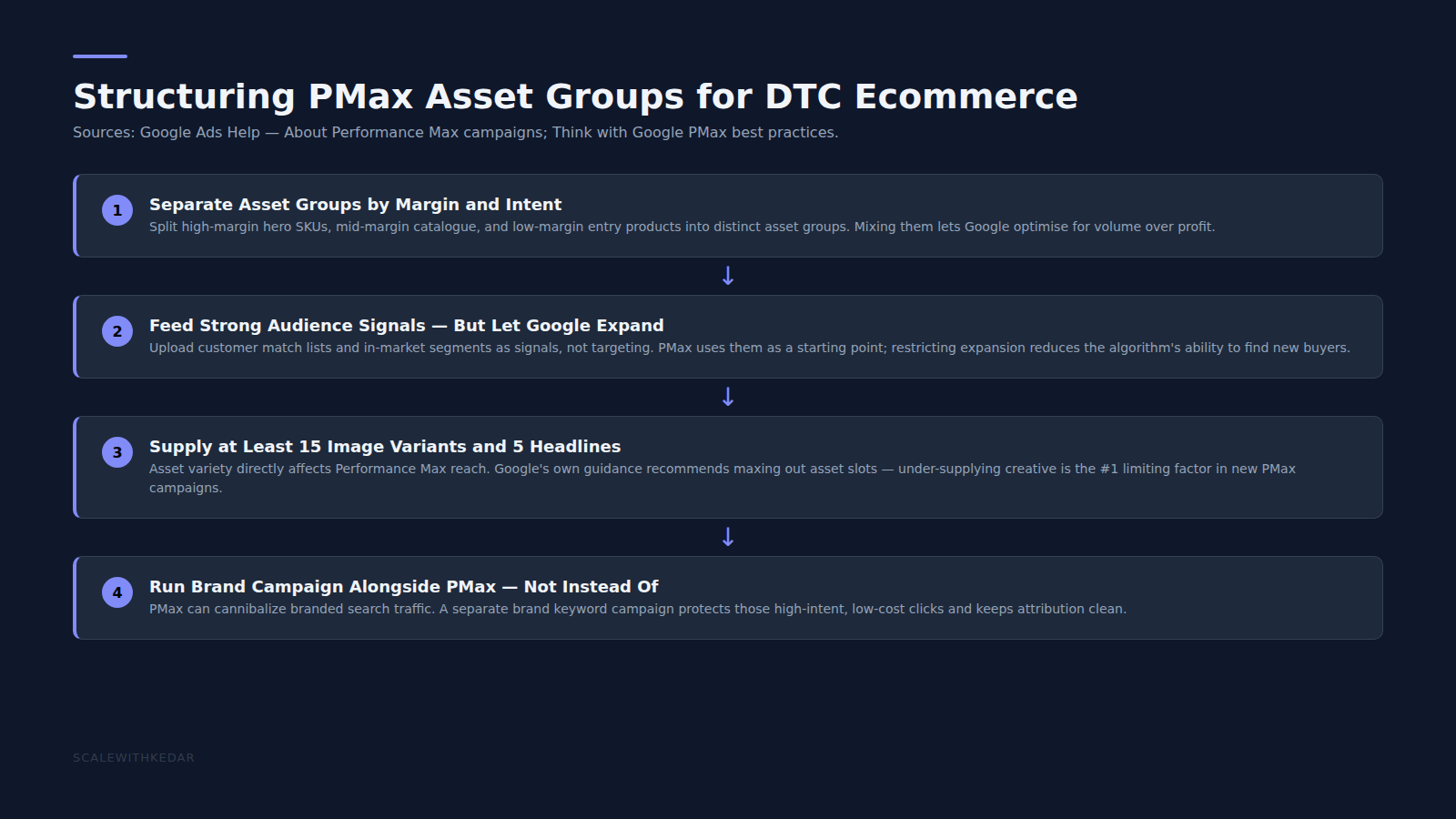
The single biggest lever inside PMax for DTC brands is asset group structure. The default approach — one asset group for all products — is almost always wrong at meaningful scale.
The structure that tends to outperform:
- Segment by product category, not by SKU: Build one asset group per major product category (skincare, supplements, homewear, etc.) so that ad copy and creative assets are genuinely relevant to what’s being shown.
- Use listing groups (product filters) within each asset group: Inside each category asset group, filter to only the relevant products via listing group rules. This replaces the old ad group structure from Standard Shopping.
- Keep hero products in a separate asset group: Your top 5–10 SKUs by revenue should have their own dedicated asset group with highly specific copy and creative. They’ll absorb more budget and need tighter signals.
Audience Signals: The Input Google Won’t Tell You Matters This Much
PMax lets you add “audience signals” — not targeting, but hints about who your best customers are. Google uses these as a starting point, then expands from there. Most accounts underinvest here.
The signals worth adding, in order of impact:
- Customer Match list of recent purchasers: Your 90-day or 180-day purchaser list is the strongest signal you can give PMax. Upload it as a Customer Match audience and add it to every asset group.
- Website visitors with purchase intent: Segments like “Visited product pages in last 30 days” or “Added to cart but didn’t purchase” provide strong signals without being overly restrictive.
- Custom intent segments: Build custom audiences based on search terms your competitors rank for, or product-specific queries. Add these as signals alongside your CRM data.
Per Google’s PMax documentation, audience signals don’t restrict delivery — they inform the ML model. This distinction matters: you’re not limiting who sees the ads, you’re teaching the algorithm where to start looking.
The Creative Asset Requirements You Actually Need to Hit
PMax grades your asset group quality as “Poor,” “Good,” or “Excellent.” Excellent-rated asset groups routinely outperform Good-rated ones by 15–20% in ROAS at the same budget. The difference between Good and Excellent usually comes down to:
- Video assets: A 10–60 second video is required for YouTube inventory. Accounts that skip video miss YouTube entirely — a significant omission for brand-led DTC categories. Even a well-produced static-image video (product shots + text overlay) outperforms nothing.
- Square and landscape image variants: Provide multiple image formats. PMax will auto-crop, but giving it the right source images reduces quality loss.
- Headline and description variety: Use all available headline slots (15) and description slots (5). Avoid repetitive messaging — Google ML tests combinations, so variation increases the chance of finding a winner.
Brand Exclusions: The Setting That Protects Your Efficiency Metrics
PMax by default will bid on your branded search terms — your own brand name, product names, etc. This inflates ROAS artificially (branded searches convert at a much higher rate) and makes it look like PMax is performing better than it is while cannibalising traffic from a simple branded search campaign that costs a fraction of the CPL.
Always set brand exclusions in PMax. Do this via Campaign Settings → Brand Exclusions → add your brand terms. This forces PMax to focus on new customer acquisition rather than harvesting existing demand you’ve already built.
For brands doing $10M+ in revenue, also consider a separate Standard Shopping or Search campaign for branded terms running alongside PMax, with explicit negative keywords ensuring there’s no overlap.
Search Term Visibility and the Insights Tab
One of the most persistent complaints about PMax is the lack of search term transparency. You can’t see the exact queries your ads showed on the way you could in Standard Shopping. This limitation is real but partially mitigated.
Use the Insights tab within PMax to see:
- Search category performance (broad categories of queries that triggered your ads)
- Asset performance ratings (which headlines/images/descriptions are performing)
- Audience segment performance (which signals are contributing)
For additional query-level data, run a Search Terms report from your broader account view — queries that generated conversions often appear there even if they were served through PMax. Use this to refine your negative keyword list at the account level.
When to Use PMax vs Standard Shopping vs Search
PMax isn’t right for every situation. Here’s a practical decision framework:
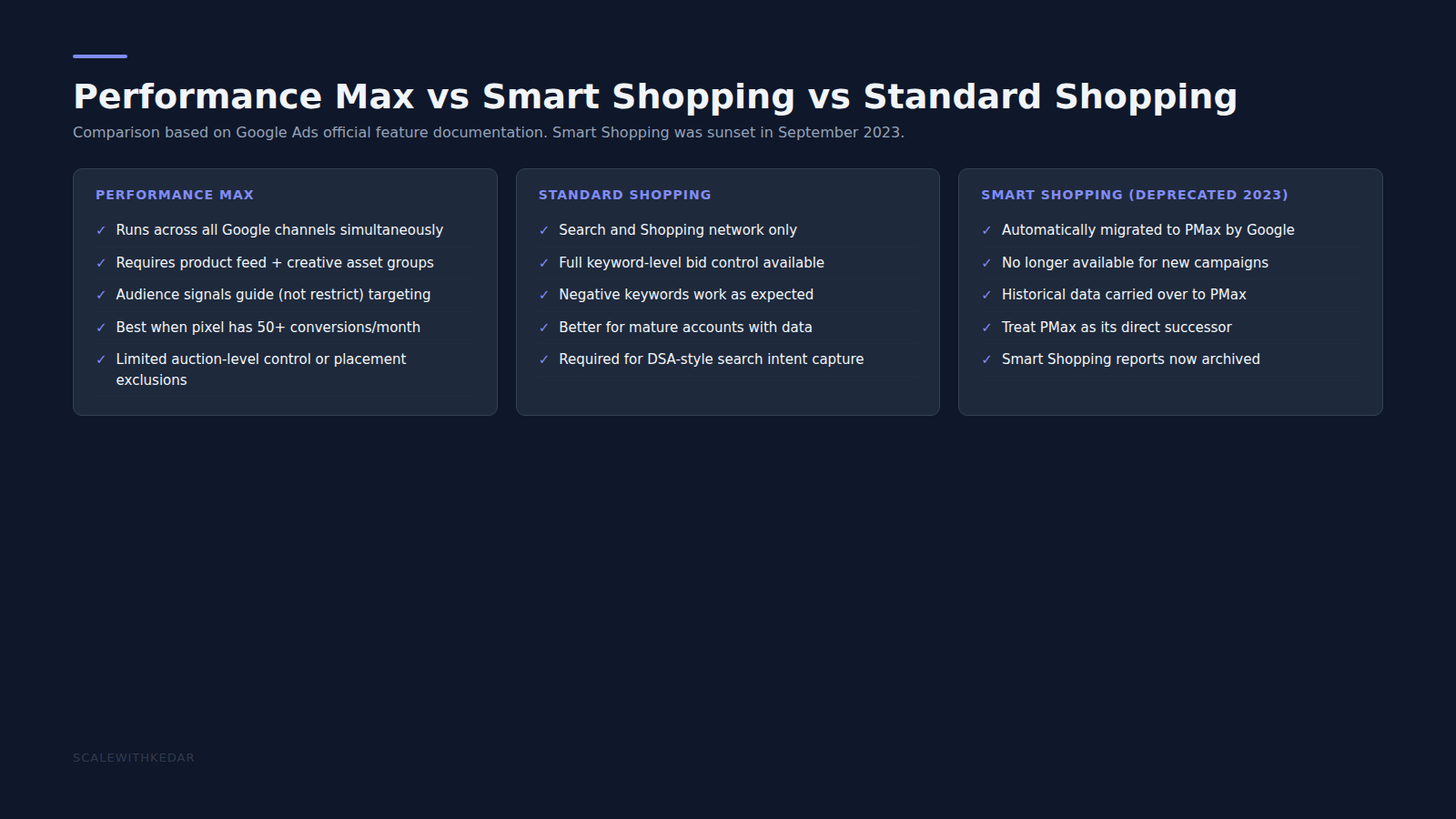
- Use PMax when: You have 30+ conversions per month, a rich product feed, and creative assets ready. PMax needs conversion data to optimise — below 30 conversions/month, the ML model doesn’t have enough signal.
- Use Standard Shopping when: You’re a newer account building conversion history, or you need maximum transparency on query-level data for a specific product line.
- Use Search when: You’re targeting specific high-intent queries for a hero product, or running branded campaigns. PMax doesn’t give you the control Search does for these use cases.
- Use all three together: At scale, the highest-performing Google Ads accounts typically run PMax for general product discovery, Standard Shopping for proven mid-funnel categories, and Search for branded + high-intent non-brand terms.
Running PMax but not sure why ROAS has plateaued?
A structured account audit often surfaces the same three issues: weak audience signals, missing brand exclusions, and under-resourced creative assets. We audit DTC Google Ads accounts and return a specific action list, not a generic report.
Common PMax Mistakes That Tank ROAS
- Running without an audience signal: Empty audience signals mean the algorithm starts cold with no information about your best customers. Always add at least a purchaser list.
- Setting too aggressive a Target ROAS too early: If your tROAS is set higher than your historical account ROAS, PMax will under-serve (it can’t find enough conversions that meet the threshold). Start at 80–90% of your current ROAS and increase gradually.
- One asset group for all products: Category-level segmentation almost always improves relevance and ROAS. Budget a week to restructure if you’re currently running everything in one group.
- Not excluding brand terms: Without brand exclusions, PMax ROAS is overstated and acquisition efficiency is understated. Always exclude branded terms.
- Evaluating too early: PMax needs a learning period of 4–6 weeks minimum before results stabilise. Don’t judge the campaign in its first two weeks.
PMax done correctly is one of the highest-leverage tools available to DTC brands on Google — particularly for product discovery and reaching shoppers earlier in the purchase journey than branded Search. The brands that struggle with it are almost always under-investing in asset quality or running it with insufficient conversion data. Fix the inputs, and the outputs improve.
For related reading on building the paid media stack around PMax, see our guide on Meta Lookalike Audiences for DTC prospecting and our D2C retargeting strategy playbook for the lower-funnel layers that work alongside PMax.
Sources and Further Reading
- Google Ads Help: About Performance Max campaigns — official documentation on PMax campaign setup, asset groups, and audience signals.
- Google Ads Help: Performance Max best practices — Google’s own guidance on asset quality, audience signals, and campaign structure.
- Google Ads Help: Brand exclusions for Performance Max — official instructions for adding brand exclusions to PMax campaigns.