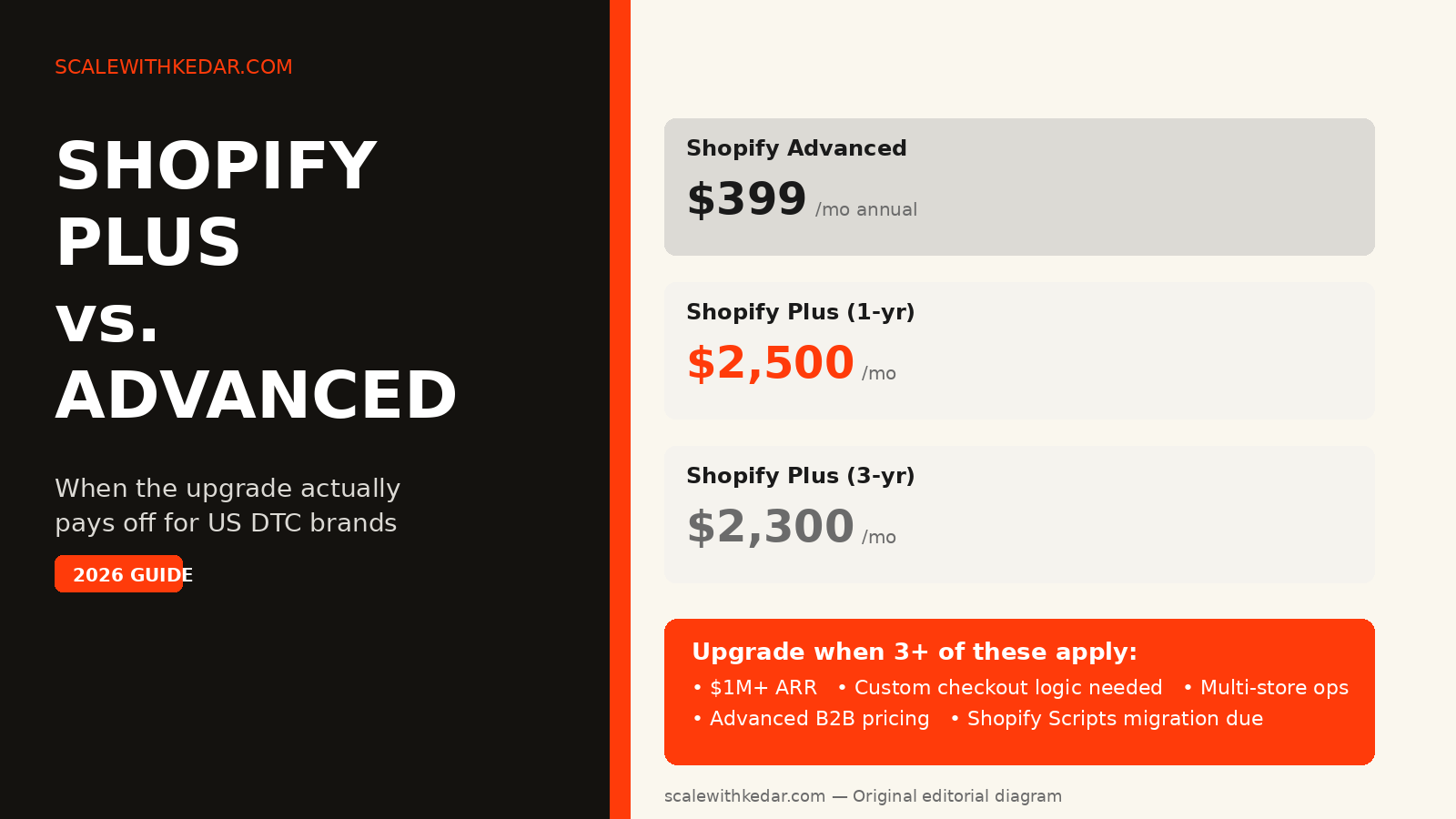
Most US DTC founders either upgrade to Shopify Plus too early — before the math works — or a year too late, after custom checkout limitations have already cost them revenue. The decision comes down to a handful of specific operational needs, not a single revenue milestone. This guide gives you the cost math and the decision signals to know exactly where you stand.
What Shopify Plus Actually Costs in 2026
Shopify Plus is a contract-based plan with two main pricing tiers as of late 2026 (verified against third-party sources published in mid-2026; confirm current rates directly with Shopify before any commercial decision):
- 1-year term: approximately $2,500/month
- 3-year term: approximately $2,300/month
- High-volume variable rate: once your monthly GMV exceeds roughly $800,000, Plus may switch to a percentage-based fee (reported by third-party sources at approximately 0.35% of revenue, capped around $40,000/month) — confirm your exact rate with Shopify
Compare that to Shopify Advanced at approximately $399/month on annual billing. The headline gap is around $2,100/month — but the headline number is the wrong place to start the analysis.
The Transaction Fee Offset You Need to Calculate
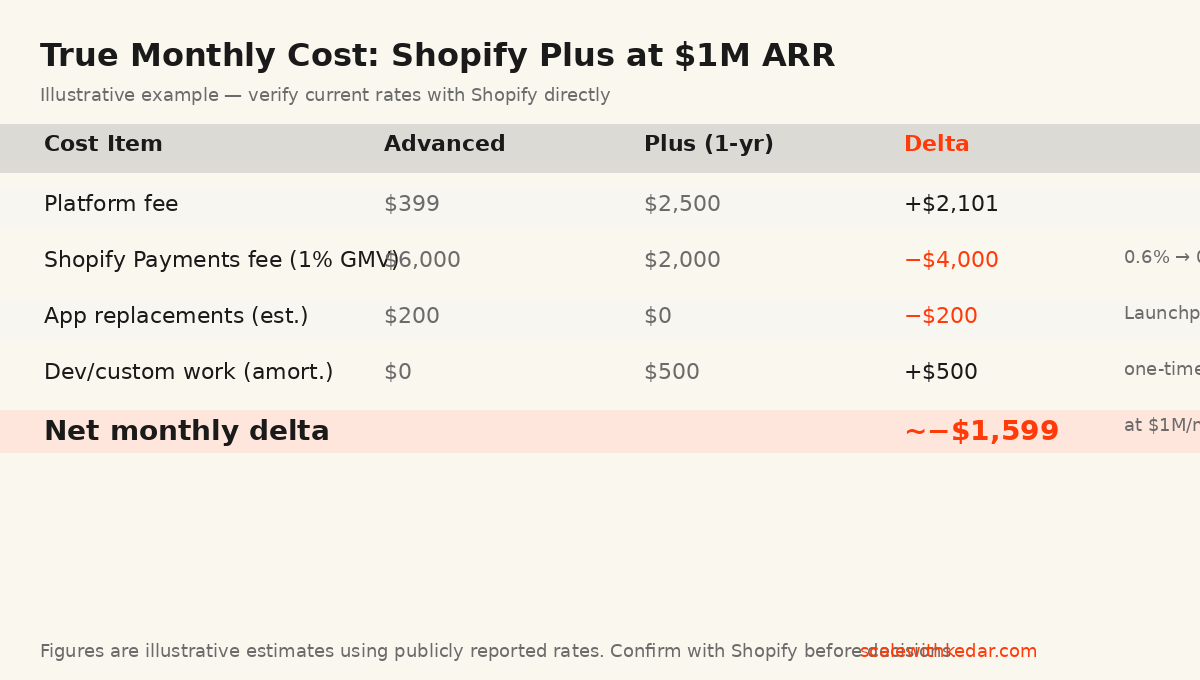
Shopify Advanced charges 0.6% on Shopify Payments transactions. Plus drops that to approximately 0.2%. At $1 million in monthly GMV, that difference is $4,000/month — nearly enough to cover the platform fee increase on its own.
A simplified illustrative example at $1M/month GMV on Shopify Payments:
- Platform fee increase: approximately +$2,101/month (Advanced → Plus, 1-year term)
- Transaction fee savings: approximately −$4,000/month (0.4% on $1M GMV)
- App cost reduction (Launchpad replaces some scheduling tools): approximately −$200/month
- Net monthly delta: approximately −$1,699/month in your favor
At lower GMV, the math inverts quickly. At $300K/month, the transaction fee savings are roughly $1,200 — well short of the $2,101 fee increase. These are illustrative estimates; your actual numbers depend on Shopify Payments usage, your exact contract rate, and which apps Plus may replace. Run the real numbers with your current data before deciding.
The Six Upgrade Signals That Actually Matter
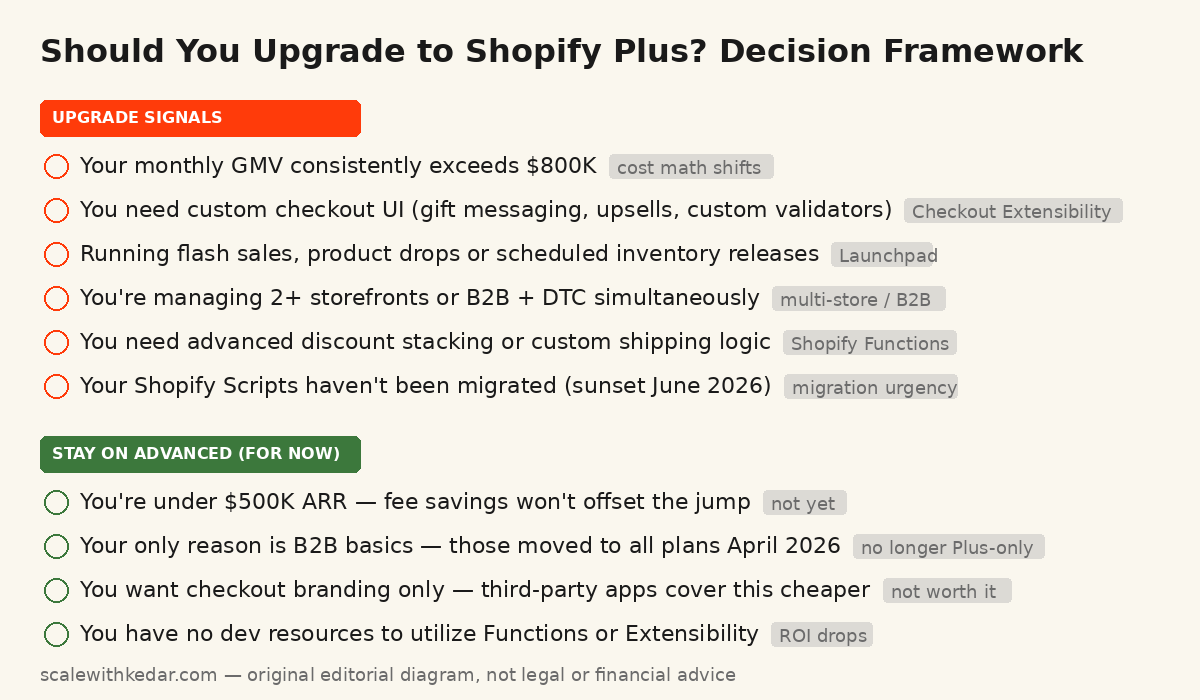
Revenue thresholds are a rough guide. The real decision is whether you need what Plus specifically unlocks. Here are the capabilities that move the needle for US DTC brands — most brands that upgrade profitably need at least three of these simultaneously.
1. Checkout Extensibility and Custom Logic
As of August 2025, Shopify retired checkout.liquid entirely. All checkout customization now runs on Checkout Extensibility — UI Extensions, the Branding API, and Shopify Functions. Some extensibility is available on lower tiers, but the full capability set, including custom field injection, conditional UI elements, and deep post-purchase pages, is a Plus-level feature.
If your conversion strategy requires: gift message fields, address validator customizations, conditional upsell offers at checkout, or loyalty point display during checkout — you need Plus. If your checkout requirements are standard, this isn’t a forcing function yet.
2. Shopify Functions for Backend Logic
Shopify Scripts were sunset on June 30, 2026. If your brand was using Scripts for custom discount stacking, conditional free shipping, or payment method filtering, those needed migration to Shopify Functions before that date. Functions are the current standard for backend logic customization, and advanced Function throughput is a Plus-level capability.
If you haven’t migrated yet, this is a blocking issue regardless of the upgrade decision.
3. Launchpad for Timed Events
Product drops, flash sales, scheduled price changes, and coordinated inventory releases are all handled by Launchpad — a Plus-only automation tool. If you’re running holiday campaigns with timed promotions, doing influencer product drops, or managing limited-edition releases, Launchpad eliminates manual coordination errors that cost revenue during high-traffic windows.
4. Multi-Store and Expansion Store Operations
Plus includes expansion store management under one organization contract — confirm current store limits directly with Shopify, as these terms have changed. If you’re operating separate storefronts for DTC, wholesale, and international markets, or building distinct brand properties, multi-store management under one organization is a significant operational simplification.
5. Advanced B2B Pricing and Payment Controls
Shopify expanded core B2B features to all plans in April 2026. Basic B2B catalogs and company accounts are no longer a Plus-only reason to upgrade. However, advanced account-level pricing rules, payment terms management at scale, and deep B2B API integration remain Plus-oriented capabilities. If your wholesale channel is significant and you need fine-grained pricing by account or company location, Plus still earns its cost on this axis — but confirm the exact boundary with Shopify’s current plan documentation.
6. API Rate Limits and Integration Complexity
Plus dramatically increases API call limits — relevant if you’re running complex ERP integrations, multiple third-party data pipelines, or high-volume inventory sync. If your middleware is regularly hitting rate limits on Advanced, that’s a quiet bottleneck that compresses operations and creates data lag. This is easy to miss until it’s actively causing synchronization errors.
Upgrade Decision Framework (Animated Explainer)
Upgrade decision framework — 9-second animated explainer showing each signal and the final verdict. Original motion produced locally with Playwright and ffmpeg. Static version in the diagram above covers the same content. scalewithkedar.com.
When NOT to Upgrade: The Honest Cases
Agencies frequently recommend the upgrade to brands who aren’t ready. Here’s when to wait:
- Under $500K ARR: The transaction fee savings won’t cover the platform fee increase at this scale. Optimize your current plan’s conversion rate first.
- B2B is your only reason: Core B2B features are now available on all plans. Confirm the specific capabilities you need against current plan documentation before paying for Plus.
- Checkout branding is your only reason: Third-party apps cover checkout branding (colors, fonts, logo) on lower tiers at a fraction of Plus pricing.
- You have no dev resources: Functions, Extensibility, and custom Hydrogen storefronts require developer time. If you can’t execute on them, you’re paying for capability you won’t use. Plus ROI depends heavily on implementation capacity.
What Most Brands Get Wrong About the Timing
One pattern comes up repeatedly with US DTC brands in the $1M–$5M ARR range: they upgrade based on a single feature need that could be solved more cheaply, then discover the full value of Plus six to twelve months later. The upgrade isn’t wrong — the timing and justification are.
A more useful framing: identify the specific capability gap that’s costing you measurable revenue or operational capacity today, estimate what it’s costing monthly, and compare that to the true net cost of the upgrade. The features that justify Plus at $1M ARR typically don’t justify it at $400K ARR — but they’re legitimate forcing functions at the right scale.
Pre-Upgrade Checklist
- Calculate your true monthly GMV on Shopify Payments and the exact transaction fee delta
- List the specific capabilities you need — not the category, but the exact feature and why it affects revenue
- Verify which features are actually Plus-only versus available on Advanced or via third-party apps (Shopify’s plan comparison page is the authoritative source)
- Get a contract quote for both term lengths — the 3-year vs 1-year delta is meaningful
- Budget for implementation: developer time for Functions migration, Extensibility setup, and any custom storefront work
- Define a 90-day post-upgrade metric: what specific number improves, by how much, within 90 days?
Sources and Verification Notes
Shopify Plus pricing figures cited in this article are based on third-party analyses published in mid-2026, including data from First Pier and Meetanshi, cross-referenced against multiple other sources. Exact pricing, transaction fee rates, plan feature boundaries, and contract terms change — confirm every figure directly with Shopify before making any commercial decision. Feature availability (particularly B2B and Checkout Extensibility) shifted significantly in 2025–2026; Shopify’s current plan comparison page is the only authoritative source.
Is This the Right Move for Your Brand?
If you’re approaching the upgrade decision with $800K+ in monthly GMV, multi-store needs, or a specific checkout customization that’s visibly suppressing conversion, this is worth a structured analysis — not a side-by-side spec sheet comparison.
I work with US DTC and ecommerce brands on performance marketing, attribution, funnel architecture, and technology decisions like this one. If you want a clear-eyed view of whether Plus is the right move for your current setup — and what you’d need to do to get full ROI from it — you can reach out here for a strategy conversation.