One of the most consistent ROAS killers I see in DTC ad accounts is this: brands hit a real ceiling with their initial prospecting audiences, and instead of expanding thoughtfully, they either go too broad (wasting budget on low-intent users) or stay too narrow (starving their campaigns of reach). Meta Lookalike Audiences sit right in the middle of that trade-off — and most brands use them wrong.
This guide covers how to build, stack, and iterate Meta Lookalike Audiences specifically for DTC e-commerce brands: from choosing the right seed, to the right audience size, to when to refresh. All of it grounded in Meta’s documented Lookalike Audience methodology.
Reviewed August 2026 — features and behaviour based on Meta Ads Manager documentation current at time of writing. Always verify in your own account.
What Meta Lookalike Audiences Actually Do
A Lookalike Audience tells Meta: “Find people who look like my best existing customers.” You provide a source audience — ideally your purchaser list or high-LTV customer segment — and Meta scans its platform to find users with similar demographic and behavioural patterns. In a country like the United States, where Meta’s addressable audience exceeds 200 million monthly active users, this is a genuinely powerful prospecting tool.
The mechanism that makes lookalikes work is Meta’s access to on-platform behavioural signals — pages liked, content engaged with, purchase patterns, apps used — combined with the characteristics of your seed audience. The quality of your output is directly proportional to the quality of your seed.
The Seed Audience Problem: Why Most Lookalikes Underperform
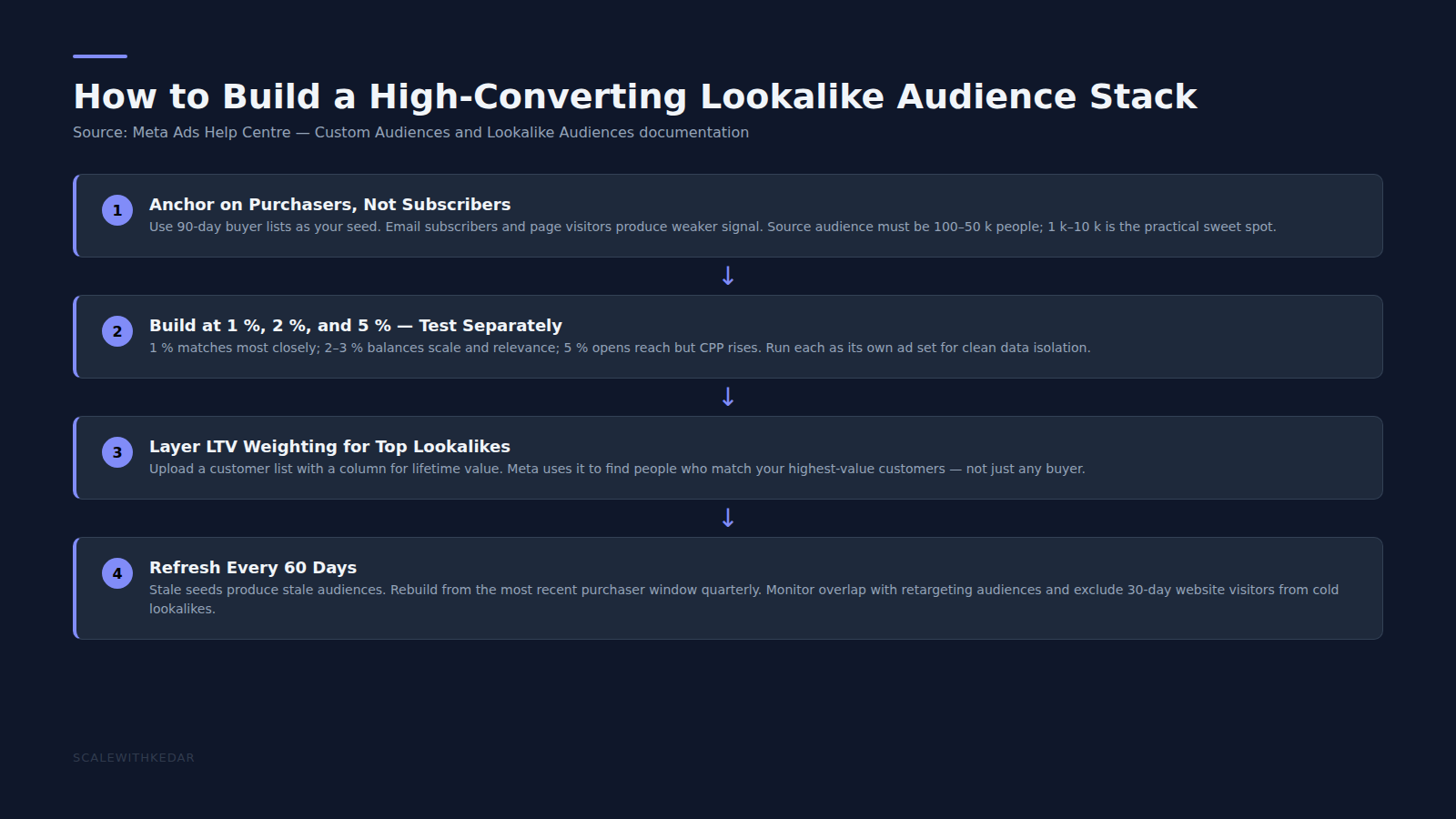
The single biggest lookalike mistake: building from the wrong source. Here’s the hierarchy, from strongest to weakest seed:
- LTV-weighted customer list — upload a CSV with a lifetime value column; Meta optimises toward users matching your highest-value buyers, not just any buyer
- 90-day purchaser list — recent buyers carry stronger signal than lifetime buyers because recency correlates with active purchase intent
- 30-day add-to-cart or checkout initiators — good signal but includes non-converters; useful when purchaser list is under 1,000 people
- Website visitors or email subscribers — lowest signal-to-noise ratio; builds audiences that include casual browsers with no purchase intent
Meta’s own documentation recommends a source audience of 1,000 to 50,000 people for optimal lookalike quality. Under 1,000 and the model lacks sufficient signal; over 50,000 and you’re likely including lower-quality data that dilutes the output. If your purchaser list is small, use a broader 6-month or 12-month window rather than a weaker source type.
Audience Sizes: The 1% vs 5% Trade-off
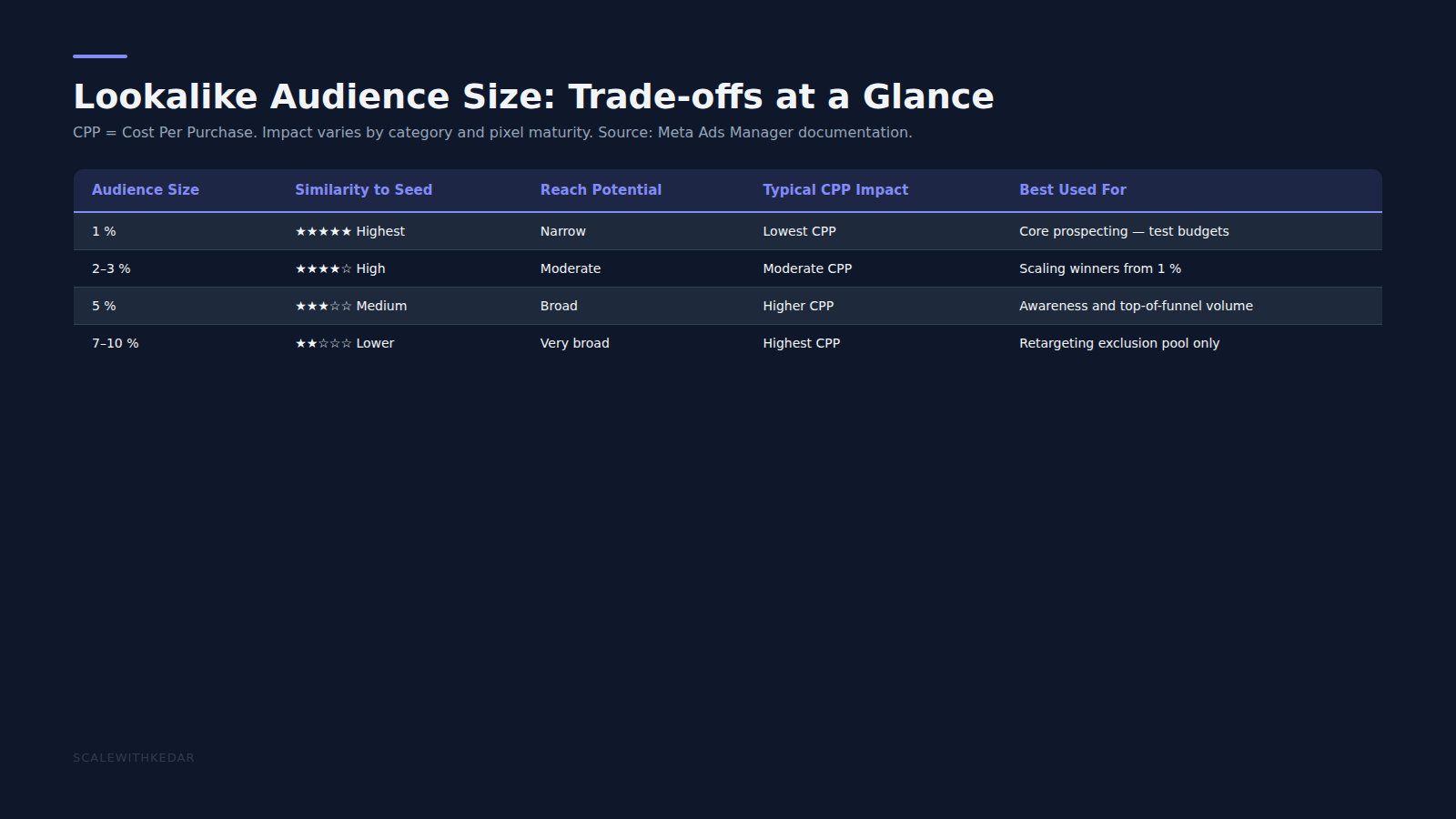
Meta expresses lookalike size as a percentage of a country’s total Facebook population. 1% means the users most similar to your seed; 10% casts the widest net. The practical sweet spot for DTC brands depends on your objective:
- 1%: Highest similarity — best CPP, narrowest reach. Use for testing and for smaller ad budgets where efficiency matters most.
- 2–3%: Balanced reach and similarity. Scale winners from your 1% test into this range to increase volume without a large CPP increase.
- 5%: Noticeably broader — expect higher CPP but greater reach. Better for brands in large markets (US, UK) where a 1% audience would be exhausted quickly at higher spend.
- 7–10%: Effectively treated as broad targeting. Use primarily as an exclusion pool, not a targeting source.
Run 1%, 2–3%, and 5% as separate ad sets rather than combined, so you can read performance independently and scale what works without the data being diluted across sizes.
Stacking Lookalikes: Building a Prospecting Architecture
A single lookalike is a starting point, not a complete prospecting strategy. For a DTC brand at meaningful spend, a layered approach — using multiple lookalike sources tested in parallel — gives you both coverage and data for decision-making.
A practical starter stack for a DTC brand:
- Ad Set 1: 1% LTV-weighted customer lookalike — your highest-signal audience; smallest reach
- Ad Set 2: 2% 90-day purchaser lookalike — broadens reach while keeping intent signal strong
- Ad Set 3: 3% 180-day purchaser lookalike — more reach, slightly weaker signal
- Exclusion on all three: 30-day website visitors and existing customers — to avoid wasting prospecting budget on people already in your funnel
This structure gives the Meta algorithm competitive data across audience quality levels and lets you identify which lookalike tier performs best for your specific product and price point.
Refreshing Your Lookalikes: When and Why
Lookalike audiences are not static. Meta rebuilds them approximately every 3–7 days based on your source audience, but the source itself ages. A purchaser list with only 12-month-old buyers produces a lookalike that skews toward an older behavioural profile. The practical rule: rebuild your source audience every 60–90 days to keep the underlying data fresh.
Signs your lookalike is aging: CPP rising steadily without a corresponding increase in competition or seasonality; reach declining without audience overlap increasing; CTR falling across all creative in the ad set despite creative refresh.
When you rebuild the source, create a new custom audience rather than editing the existing one. This gives you a clean before/after comparison and avoids disrupting active campaigns mid-run.
Lookalikes and Advantage+ Audiences: What’s Changed in 2026
Meta has increasingly pushed advertisers toward Advantage+ Audiences — a setting that lets Meta expand beyond your defined audience when it predicts better results outside it. This effectively makes Advantage+ a version of broad targeting with your custom or lookalike audience as a “suggestion” rather than a constraint.
For most DTC brands at scale, using Advantage+ Audiences in prospecting campaigns alongside a lookalike signal (rather than instead of it) is a reasonable default. For smaller budgets or new accounts with limited pixel data, sticking with defined lookalike audiences gives you more control and clearer data. Meta’s Advantage+ Audience documentation covers the full detail on how expansion works.
Ready to put this into practice?
Common Lookalike Mistakes to Stop Making
- Using too small a seed: Under 500 people, Meta’s model lacks statistical confidence. Combine recent purchasers with older buyers before the list size is large enough.
- Building from unverified data: If your customer list includes test orders, staff purchases, or bad addresses, those corrupt your seed. Clean it before uploading.
- Running without audience overlap checks: Meta’s Audience Overlap tool (in Audiences) tells you when two of your ad sets are competing for the same people. Check it monthly.
- Conflating lookalike performance with creative performance: If your 1% lookalike is underperforming, test new creatives before concluding the audience is wrong. Audiences and creatives interact — change one variable at a time.
Lookalike Audiences remain one of the highest-leverage tools available to DTC brands on Meta — when built from the right source, refreshed regularly, and structured to generate clean data. If your current lookalikes aren’t pulling their weight, the fix usually starts with the seed, not the size.
For more on building the creative that fills your lookalike campaigns, see our guide on Meta Ads creative strategy and our D2C retargeting playbook for the warm and hot layers that sit downstream of your prospecting work.
Sources and Further Reading
- Meta for Business: About Lookalike Audiences — official overview of how Lookalike Audiences work and how they’re built.
- Meta for Business: Advantage+ Audience — documentation on Advantage+ Audiences and how they interact with manual audience signals.
- Meta for Business: About Custom Audiences from a Customer List — guidance on building and uploading seed audiences from CRM data.
- Meta for Business: Advantage+ Audience Signal — how to add audience signals to Advantage+ campaigns using your existing custom audiences.
- Meta for Business: Lookalike Audience Size — explanation of the 1%–10% scale and how to choose the right size for your objective.