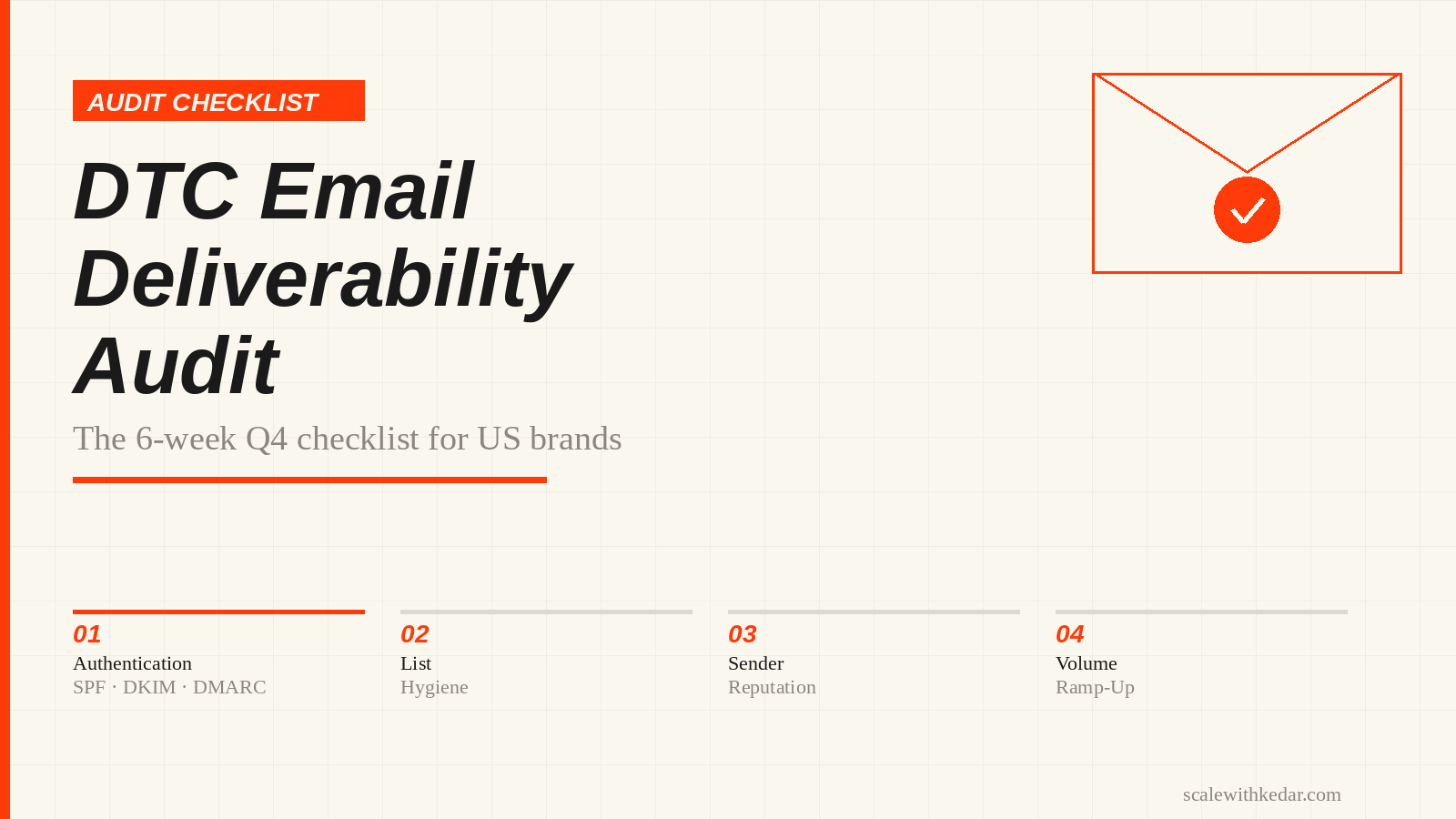
If your DTC brand sends more than a few thousand emails a week, your sender reputation is an asset worth protecting before Black Friday volume turns a small problem into a deliverability collapse. This audit walks through every layer you need to check — authentication, list hygiene, infrastructure, and engagement signals — with actionable steps you can complete over the next six weeks.
Skip any of these and your Q4 campaigns may land in spam for the ISPs that matter most: Gmail handles the majority of US consumer inboxes, Yahoo and Outlook together cover most of the rest.
Why Q4 Is a Deliverability Inflection Point
During October through December, every DTC brand escalates send frequency. ISPs see complaint rates spike. The brands that prepared — cleaned lists, verified authentication, warmed new sending infrastructure — maintain inbox placement. Those that did not see open rates fall, revenue per send shrink, and sender scores that take months to rebuild.
Klaviyo’s deliverability strategists advise starting list cleanup at least three months before Black Friday. If you are reading this in October, that preparation should already be underway. This audit treats the work as urgent, not optional.
For your Q4 send calendar, see the DTC Q4 Holiday Marketing Calendar. For campaign structure and flow strategy, see the DTC Email Marketing Playbook for Q4. This audit covers the foundation those campaigns depend on.
Step 1: Verify Authentication — SPF, DKIM, and DMARC
In February 2024, Google and Yahoo formalized requirements for senders delivering more than 5,000 messages per day to their users. Microsoft followed with equivalent requirements for Outlook.com, Hotmail, and Live.com in May 2025. These are now enforced: non-compliant messages face temporary or permanent rejection.
The three records you must have in place:
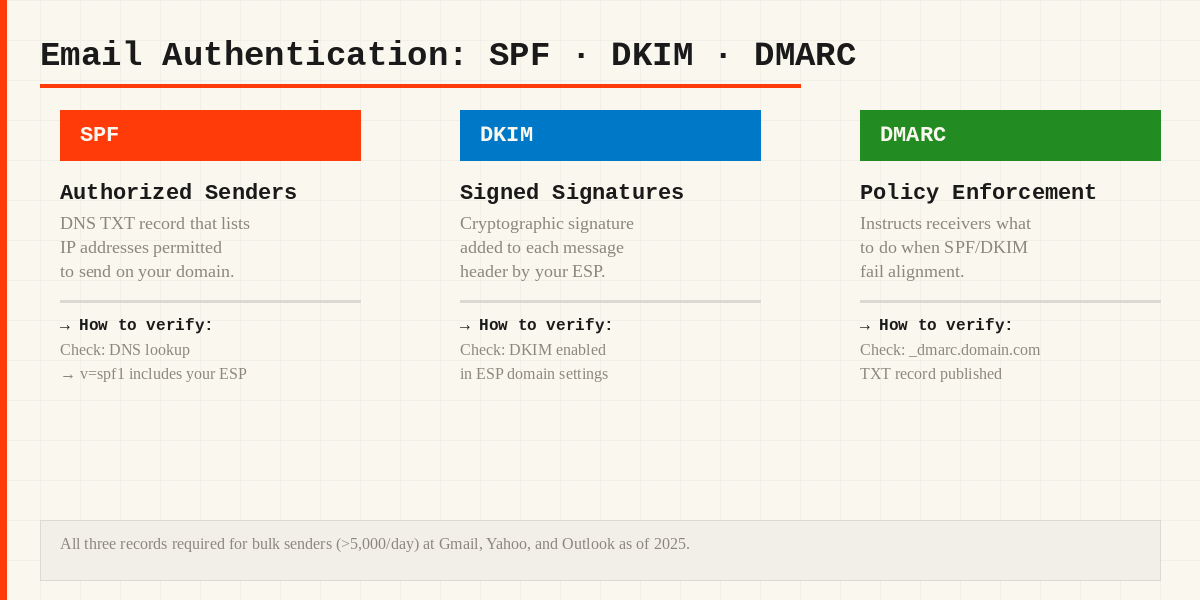
SPF (Sender Policy Framework)
An SPF TXT record in your domain’s DNS authorizes which IP addresses and services are permitted to send mail on your behalf. If you send through Klaviyo, Postmark, or another ESP, their documentation provides the exact record to publish. Check your current SPF record with any DNS lookup tool and confirm it includes every sending service you use.
DKIM (DomainKeys Identified Mail)
DKIM adds a cryptographic signature to each outbound message, tied to your domain. Your ESP generates the keypair and gives you a CNAME or TXT record to publish in DNS. Verify that DKIM is enabled in your ESP account and that the DNS record is live and correct. Most ESPs provide a verification step in their domain-authentication settings.
DMARC (Domain-based Message Authentication, Reporting, and Conformance)
DMARC instructs receiving servers what to do when a message fails SPF or DKIM alignment — quarantine it, reject it, or take no action. For bulk senders, a published DMARC record is now mandatory. A minimum policy of p=none with a reporting address satisfies the requirement, but p=quarantine or p=reject provides stronger protection against domain spoofing.
Check your DMARC TXT record at _dmarc.yourdomain.com. If it does not exist, create it. If it is set to p=none with no monitoring, set up a DMARC reporting inbox to catch alignment failures before tightening the policy.
One-Click Unsubscribe
Gmail and Yahoo also require a List-Unsubscribe-Post header (RFC 8058) for bulk senders. This enables the one-click unsubscribe button in Gmail’s interface. Honor requests within two days. Most major ESPs add this header automatically; verify it is enabled in your account settings. An unsubscribe that requires multiple clicks or a login is non-compliant.
Step 2: Set Up a Dedicated Marketing Subdomain
Your transactional email domain (order confirmations, receipts) and your marketing domain should have separate sender reputations. A spam complaint on a promotional blast should not risk your transactional mail reaching customers.
The practical setup is a subdomain dedicated to marketing sends, such as mail.yourbrand.com or hello.yourbrand.com. Configure SPF, DKIM, and DMARC records on that subdomain and set it as your From: address domain in your ESP. This isolates marketing reputation from transactional reputation and allows more targeted reputation monitoring.
If you are already sending from a subdomain, verify the authentication records are correct for it specifically — a DMARC policy on the root domain does not automatically apply to subdomains unless your policy includes sp=.
Step 3: Check Your Current Sender Reputation
Before your Q4 campaigns begin, you need a baseline. These are the primary tools:
Google Postmaster Tools
Google provides domain-level and IP-level reputation data for mail sent to Gmail addresses. You can see spam rate, domain reputation (High / Medium / Low / Bad), IP reputation, and authentication pass rates. Register your sending domain at postmaster.google.com and check the dashboard. Data appears once you have enough volume.
The target is “High” domain reputation. A “Medium” rating warrants attention before volume increases. “Low” or “Bad” requires intervention before Q4 sends.
Blocklist Check
Check your sending IP and domain against Spamhaus and MX Toolbox’s multi-blocklist lookup. A single blocklist listing can suppress delivery to a significant portion of US inboxes. If you find a listing, follow that blocklist’s delisting process, then investigate what triggered it — typically a spam complaint spike, a bad list segment, or a misconfigured ESP setting.
Microsoft SNDS
For Outlook and Hotmail delivery, check Microsoft’s Smart Network Data Services (SNDS) tool for IP-level data on complaint rates and delivery classification.
Step 4: List Hygiene — What to Clean Before Q4
A smaller, more engaged list outperforms a large, stale one in both deliverability and revenue. ISPs weight engagement signals heavily; a large volume of unopened mail from disengaged subscribers increases your spam complaint rate and suppresses your sender reputation.
Remove Hard Bounces
Hard bounces — permanent delivery failures — must be suppressed immediately. Most ESPs auto-suppress after the first hard bounce. Audit your suppression list to confirm this is working correctly.
Identify and Handle Long-Inactive Subscribers
The standard trigger for a sunset flow is no opens, clicks, or site activity in the previous 180 days. The practical approach:
- Build a segment of subscribers with zero engagement in 180+ days who have not placed an order in that period.
- Send a 2–3 email re-engagement sequence over two to three weeks. Keep it short. One subject line that works: the subscriber’s name and “Still there?” with a clear re-opt-in CTA.
- Exit anyone who opens, clicks, or visits the site before the sequence ends.
- Suppress those who complete the sequence without engaging.
Klaviyo’s Academy reports a median open rate of 3.66% for sunset flows — that figure is useful context when setting expectations, not a target. A re-engagement rate above 20% usually means the segment was defined too broadly and includes subscribers who were not actually inactive.
For win-back strategy for lapsed buyers specifically, see the DTC Customer Winback Campaigns guide.
Spam Rate Target
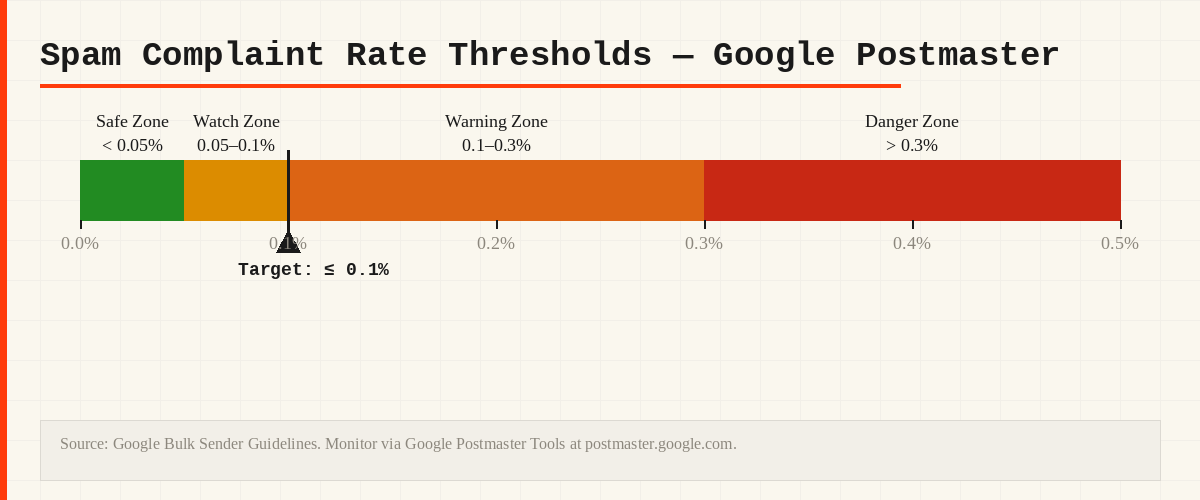
Gmail’s guidelines put the maximum tolerable spam complaint rate at 0.3% (3 complaints per 1,000 sends), with 0.1% as the recommended ceiling. Monitor this in Google Postmaster Tools after each major campaign. A single high-complaint send can suppress your sender reputation for weeks.
Step 5: Segment Before You Scale Send Volume
One of the most common deliverability errors is treating a Q4 sale as a reason to mail the entire list simultaneously. Start with your most engaged subscribers and expand outward:
- Tier 1: Opened or clicked in the last 90 days. These are your safest senders — they establish the baseline reputation for the campaign batch.
- Tier 2: Opened or clicked in 91–180 days. Send slightly later or with subject-line variations tested on Tier 1.
- Tier 3: Buyers with no recent engagement, or subscribers at 180+ days inactive who passed your re-engagement sequence.
Rather than a simultaneous blast to the full base, ramp volume starting in mid-November. This mirrors natural send-volume growth and avoids the sudden volume spike that ISPs treat as a signal of spam.
For advanced segmentation including RFM-based tiers, see the Klaviyo Email Flows guide and the DTC Q4 Audience Segmentation guide.
How Email Authentication Protects Inbox Placement
The animation below shows how SPF, DKIM, and DMARC work together to route an authenticated email to the inbox versus spam.
Step 6: Pre-Send Inbox Placement Testing
Before sending a high-stakes campaign, run it through an inbox placement testing tool such as GlockApps, Litmus, or Mail-Tester. These services send your message to seed inboxes at major ISPs and report whether it lands in the inbox, spam folder, or promotions tab.
Check for:
- Authentication pass rate (SPF, DKIM, DMARC all passing)
- Spam score (SpamAssassin and similar)
- Image-to-text ratio (heavy image emails with minimal text score worse)
- Link reputation (avoid shortened URLs; check linked domains against blocklists)
The 6-Week Pre-Black-Friday Timeline
| Week | Action |
|---|---|
| Week 1 (Now) | Audit SPF, DKIM, DMARC records. Check Google Postmaster Tools. Run blocklist check. |
| Week 2 | Set up dedicated marketing subdomain if not already in place. Fix any authentication gaps. |
| Week 3 | Build inactive segments (180+ days). Launch sunset/re-engagement flow. |
| Week 4 | Remove hard bounces. Complete sunset suppressions. Recheck reputation baseline. |
| Week 5 | Run inbox placement test on a sample Black Friday email. Fix any issues flagged. |
| Week 6 | Begin ramped sends to engaged segments. Monitor Postmaster Tools daily from mid-November. |
Frequently Asked Questions
Does DMARC affect my deliverability directly?
DMARC itself does not improve inbox placement. It protects your domain from spoofing and is now a mandatory technical requirement for bulk senders at Gmail, Yahoo, and Outlook. Without it, your messages may be rejected outright; with it in place and aligned, you meet the baseline. Reputation and engagement drive inbox placement from there.
How long does it take to recover from a bad sender reputation?
Recovery depends on the severity and your send volume. A “Medium” Google Postmaster reputation that results from a single high-complaint campaign typically recovers within two to four weeks of sending only to engaged subscribers with low complaint rates. A “Low” or “Bad” rating requires more time and often a formal warm-up process from a new subdomain or IP.
My ESP says my deliverability is fine. Is that enough?
ESP dashboards typically report delivery to their outbound servers, not inbox placement. A message can be “delivered” in the ESP’s reporting while landing in the spam folder of every Gmail recipient. Google Postmaster Tools and inbox placement testing tools are the authoritative sources for actual inbox performance.
Should I offer a discount in my sunset flow?
There is no consensus. The conservative view is that you are trying to identify genuinely interested subscribers, not create temporary engagement with an incentive. If the primary goal is a clean list, a simple re-opt-in confirmation is cleaner. If the goal is recovering buyers who lapsed, a modest offer may make sense. Test it against a no-discount version if your volume allows.
Work on Your Email Deliverability Before Q4
If your DTC brand is preparing for Black Friday and you want a review of your email setup, current sender reputation, and list hygiene approach, send a deliverability audit inquiry. Include your ESP, approximate list size, and the last time you ran a major list cleanup so the conversation can focus on what matters for your situation. You can also review the available performance marketing services.